TCLogger: Cross-Platform SMPTE Timecode Logger
Overview
Built at Ice House Productions as part of the TCode product suite, TCLogger is a cross-platform, software-based timecode logging application designed for live video production and post-production tape workflows.
Whether logging events during a live show or taking notes while reviewing tape, TCLogger keeps operators focused on the action rather than the clock. By connecting any timecode-enabled device—such as a professional VTR or broadcast timecode generator—to a computer’s standard audio input, TCLogger delivers frame-accurate logging without specialized timecode reader hardware.
Features at a Glance
- NTSC, PAL & Film Support: Full support for broadcast and cinema frame rates.
- NLE Batch Capture Export: Generates Final Cut Pro and Avid batch capture lists alongside plain text output.
- Timecode Event Server (TES) Integration: Connects directly with TES, Ice House Productions’ timecode-based messaging and browser timeline system.
- Programmable In & Out Offsets: Configure independent in-point and out-point timecode offsets to compensate for operator reaction time or pre-roll/post-roll padding.
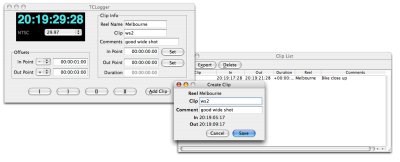
- Focused Interface: Clean, single-window UI with live timecode readout, audio input selection, macro controls, and an inline event log table.
- Cross-Platform Java Application: Runs across desktop and workstation operating systems using standard system audio input.
Workflow & Logging Macros
Unlike competing logging applications that depend on DV streams or serial machine control, TCLogger decodes LTC (Linear Time Code) directly from audio. This makes it possible to log live events in real time or log from tape playback using a computer’s built-in line-in port or any third-party USB or FireWire audio interface.
To keep up with fast-paced live action, TCLogger pairs independent In/Out offsets with four logging macros—In, Out, In/Out, and Out/In—allowing operators to:
- Mark fixed-length segments with a single action.
- Split a continuous event into back-to-back segments seamlessly.
- Log only good takes without rewinding the tape.
Every logging action is bound to keyboard shortcuts, eliminating the need to reach for the mouse and risk missing a cue.
Supported Platforms
- Mac OS X
- Windows 2000 / XP
- Linux / BSD
- Solaris